
01
Plan on the web
Sketch multi-day, multi-track plans in the studio. Drag waypoints, snap your line to real trails, and watch surface and elevation update as you go.
Mixed-surface route planning & navigation
Overlandi plans routes that mix motorway, gravel and singletrack, and grades every section from 1 to 10. Plan on a laptop, then ride it on your phone or on the handlebar dash pod.
The track grade
Overlandi reads the OpenStreetMap tags for each way (surface, track type, road class) and gives it a grade. Where OSM has no surface tag, a model trained on the surrounding roads fills the gap. The colour on the map, the elevation profile and the dash pod is always this grade.
How it works
Sketch multi-day, multi-track plans in the studio. Drag waypoints, snap your line to real trails, and watch surface and elevation update as you go.
Hand the motorway to Google, the dirt to Overlandi’s own algorithm, and everything between to BRouter — one seamless route, stitched from whichever suits each leg best.
Sync to your phone and navigate turn-by-turn — offline tiles, live progress for your group, and quick detours when the trail throws you a surprise.
The roster
The road specialist. Traffic-aware routes for the motorway stretch, the city escape, the boring-but-necessary miles.
DrivingWalkingCycling
The proven workhorse for everything between — elevation-aware, deeply tunable, happy on lanes and forest roads alike.
EnduroGravelTrekkingCar
Built by us, for the dirt. It knows every way’s surface grade and finds the kind of route you asked for — not just the shortest line.
Off-road nativeSurface-gradedTunable
Plan on the web, ride on the phone
Build the plan in the browser, where there’s room for the map, the elevation and the grade of every section. It syncs to the iOS app, which navigates it turn by turn.
One plan, four kinds of terrain
One route, planned in one place. Each leg is routed by whichever engine suits it, and the colours below are the grades you’d see in the app.
06:30
Motorway to the mountains. Google routes this bit; it’s good at motorways.
Google route09:10
The route switches to the Overlandi router for the gravel. Surface grade and gradient show for every section.
Overlandi router13:40
The pass is blocked. Detour round that stretch and the rest of the day’s route stays as planned.
Detour17:30
A wild-camp pitch with two bars of 4G and a spring nearby, picked out before you left home.
Wild camp · 4GDay 2
Rejoin the main route. Leave it and come back whenever you like.
Track 2 of 3Features
For trips where the good part is the bit Google won't route.
Build the route on a big screen. It syncs to the phone app.
Split a long trip into days or loops inside one plan, and switch between them on the road.
Routes snap to OSM ways. Each section gets a grade from 1 (alpine path) to 10 (motorway), plus gradient.
A third map orientation alongside north-up and heading-up. It turns the map to follow the track ahead and zooms to fit it, so a set of switchbacks fits on screen.
Adventure bike, enduro, gravel bike or 4×4. Set how much dirt you want and the router weights for it.
Pin waypoints to dates and times (campsite bookings, ferries, seasonal closures) and plan each day around them.
Exported route points go on junctions and turns, not at fixed spacing, so a hairpin stays a hairpin on the GPS.
Connect a plugged-in Garmin in the web planner to push routes and waypoints to it, and pull recorded tracks back into a plan.
Branch off to a campsite and rejoin by the quickest way, or route round a closure. The rest of the day is untouched.
Share a link and edit the same plan together. Everyone's phone gets the latest version.
Group members show on the map while you ride. Out of signal, their last known position stays, with a timestamp.
One tap alerts your group with your location. It's free.
Mobile coverage for each overnight stop in the UK and France, so you know before you get there.
Candidate wild-camp spots along the route. Local camping rules are yours to check.
Routes and maps are stored on the phone, so navigation carries on with no signal.
Short questions along the route, like confirming a surface or checking a spring. Answers go back to OpenStreetMap.
Fuel, water, food and viewpoints near your line, not within a 50 km circle of it.
Motorcycle dash pod · in testing
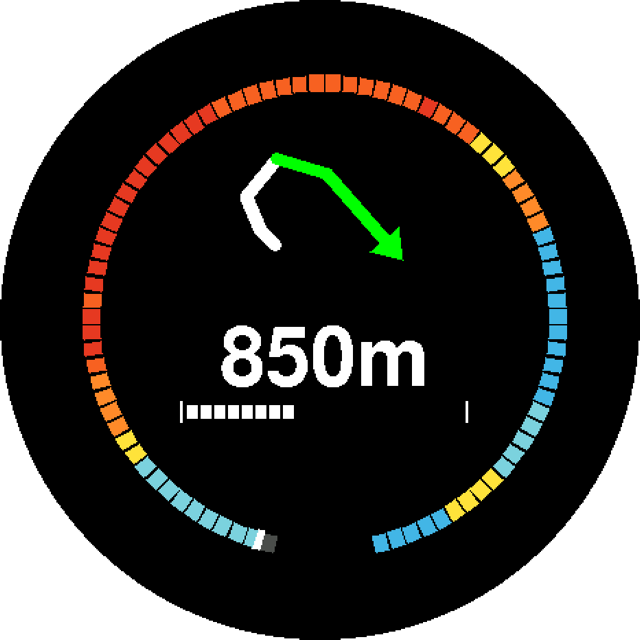
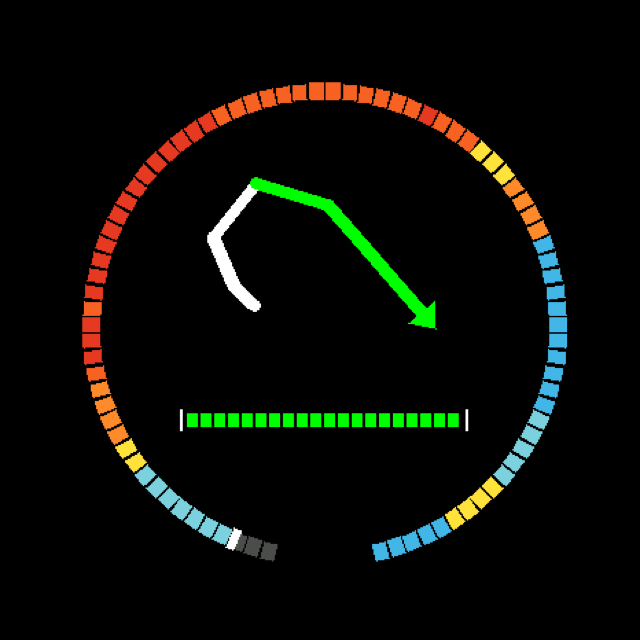
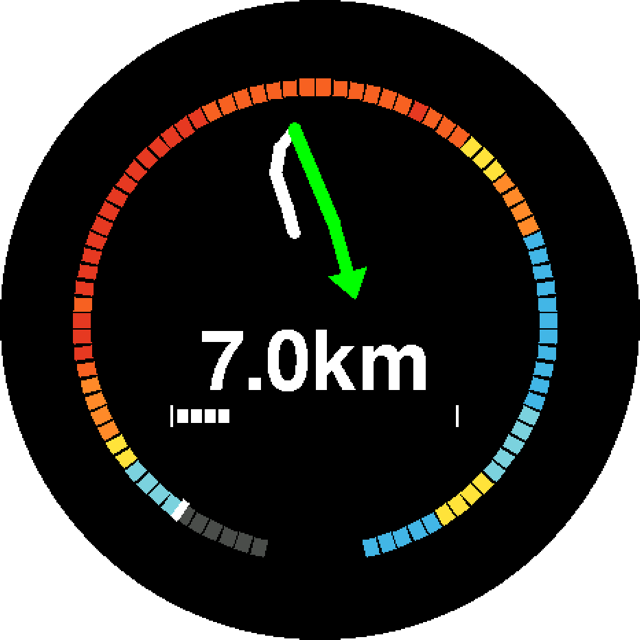
A 1.43-inch round AMOLED that mounts on the bars and takes directions from the Overlandi app over Bluetooth. The phone can stay locked in a jacket or tank bag, which saves its battery and keeps it out of the rain.
We’re running it on a Suzuki DR-Z at the moment. These are screenshots from the display itself, not mock-ups.
Snapping & surface analysis
Overlandi snaps your line to real OSM ways and grades every metre from1 (difficult) to 10 (motorway) — a grade of 0 just means it hasn’t been graded yet — and you can help grade it. See the surface mix, the steep ramps, and exactly where the tarmac runs out — while the route is still a draft, not a roadside discovery.
Navigation · Track up
North-up pins the map to the compass; direction-up spins it to your heading — and both can push part of the bend clean off the edge of the screen. Track up orients to the trail itself and fits as much of the way ahead as the viewport will hold, so the whole switchback is on screen before you reach it. Never be left guessing what’s on the other side of the switchback again.
Diversions & detours
Real trips never follow the plan exactly — a campsite worth the hop, a pass that didn’t survive the winter. Overlandi bends the route around the moment and keeps the rest of your day intact.
Branch off the main track to a campsite or any POI near your line. When you’re done, Overlandi rejoins the track ahead by the quickest route — no backtracking.
Rockfall on the pass? Reroute around just the blocked stretch. Everything after it — the trails, the camp, the plan — stays exactly as you drew it.
Itinerary & export
The unglamorous details that make or break a trip — a campsite booked for Friday, a GPX your old sat-nav can’t misread — handled properly.
Pin waypoints to dates and times — the booked refuge, the hour a col road opens — and shape each day around the points that won’t move.
Most tools drop route points at set intervals and can miss vital detail like switchbacks. Overlandi intelligently plots the route, placing points where it actually changes — every hairpin, turn and junction — so nothing gets lost on the way to your device.
Wild camping · coverage · POIs
The night matters as much as the miles. Overlandi finds wild-camp pitches and campsites along your line and, in the UK and France, checks the cell coverage at each one — so you know before you commit to the col.
Real-time sharing & collaboration
Send a link and your group is in the same plan — live cursors, instant edits, no “final_v3_FINAL.gpx” email chains. And when the plan is ready, the group travels it together too.
Groups · live locations · help signal
Invite your group and everyone gets the plan — and each other. Live locations on every phone while you travel; if someone drops out of coverage, their last-known position stays on the map, time-stamped. And when it really matters, one tap on Help tells the whole group where you are.
AI co-driver · MCP
The co-driver speaks fluent route. Ask for three days of gravel with a camp each night, and watch it work on the live map — it searches real places and unpaved ways, drops the waypoints, snaps every leg and grades the surface as it goes.
Bring your own API key — your model, your usage
Garmin sync
No cards to swap, no clumsy file shuffling, nothing to install. Plug your Garmin into your computer, connect it in the web planner (Chrome or Edge) and Overlandi syncs both ways — your planned routes and waypoints land on the unit, and the tracks you recorded out there come back into a plan, ready to analyse.
Low-bandwidth by design
Overlanding takes you where the bars run out. Overlandi is engineered to keep working on a trickle of signal — and to keep its bearings when GPS gets shaky.
Map tiles squeezed to the smallest honest size, cached on the device and fetched only for the ground you're actually heading over — not a whole region you'll never see.
Features stream as vectors wherever possible — razor-sharp at any zoom from tiny payloads, and restyled on the fly without re-downloading a thing.
Your route and the road ahead draw first; labels, terrain and the nice-to-haves fill in after. On a trickle of signal the map is useful in the order that matters.
When the fix drifts or drops out, Overlandi holds a smooth heading and position instead of letting the marker pinball across the map.
Dial GPS accuracy down to sip battery on the long days — coarser, less frequent fixes that still keep you on the line, with full precision a tap away when you need it.
Open source
Overlandi stands on the shoulders of the open-mapping community — and pulls its weight. Travelling with us makes the map better for everyone, on every app.
The community map
Every trail, surface tag and track comes from OpenStreetMap — the open map of the world, made by people who actually travel it.
Machine learning
Where the map goes quiet, our model doesn’t — trained on terrain, tree cover and gradients, it grades every track 1–10, from barely-there singletrack to main roads, even where OSM has no surface recorded.
You can help too
Classify the surface from the app and it goes directly to OSM — every answer makes off-road routing more reliable, for everyone.
OSM quests
While you ride, untagged tracks near you show a small “?” — tap one and confirm its surface in a second. Your answer sharpens Overlandi’s surface grading and, if you link an OpenStreetMap account, fixes the map for everyone, on every app.
Plan your first mixed-surface route in minutes. Free, no card, and your routes work offline.